Showing posts with label 1-Genealogy Lessons. Show all posts

Nov 9, 2008

How Do I View The Lessons?


What Are These Lessons?:
The lessons I have posted are ones that I created to teach a class of family history researchers. They are designed to provide information, outlines, tips, resources and new ideas to help each of us in our research and should work for all skill levels. These lessons were created in PowerPoint and designed for use in a classroom setting. I have published them on this site for others to use in their home or to teach with. I have converted the lessons to be viewed without using PowerPoint or a PowerPoint viewer so all you need is the internet. I did not set up the lessons to run automatically but to be advanced click by click each time you are ready to move forward, as a teacher would use it . This way you can take as much time as you need to discuss a particular point or to study the slides.


How Do I View The Lessons?:
- Choose the lesson you want on the side bar and click to open the blog page.
- Click on the image of the lesson or the link to the lesson.
- This will open the lesson in a new window for you to view.
- Wait about 10-15 seconds for the lesson to load before you begin.
- Click on the image/slide, not the tool bar on the bottom, to advance the lesson.
- If it doesn't start when you click, try clicking again in a few seconds.
- Continue to click on the image each time you are ready to move on to the next part of the lesson.
- Return to the lesson blog page after viewing the lesson for additional tips and handouts in this topic.

How Do I Use The Viewer?:


Note: Opening the slide reel allows you to speed through the slides if you want to find one later in the lesson.

Nov 8, 2008

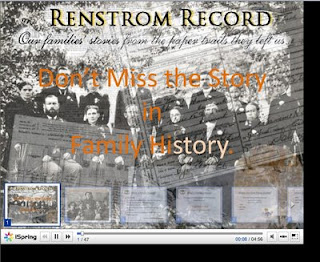
Don't Miss the Story in Family History

Lesson Example I started this blog as a way to organize and share the records I collect with others. My focus is to find out as much as I can about who my ancestors were and what their lives were like using the records I can find. I have put together this lesson on how to find the Story hidden in these records we collect.


Click on this link or the image to view the lesson:
Don't Miss the Story in Family History.

Instructions:
How Do I View The Lesson?


Lesson Handout:
Don't Miss the Story Handout


Open Handout in PDF

Sep 24, 2008

Alternate Surname Spellings

Lindeman Records "Why can't I find my Ancestor's Records?" Have you tried alternate surname spellings? Here are four different records for the same Lindeman family spelled four different ways.

Using Alternate Surname Spellings for your Ancestor can open up a world of records that may not otherwise be found. Being flexible on locations, dates, spellings, and using nicknames or looking for them among relatives can all be useful in finding those missing records. Here is a presentation I put together using Kimberly Powell's outline posted on genealogy.about.com titled Top 10 Search Tips for Finding Alternate Surname Spellings and Variations. Click on this lesson link for tips, examples and other helpful websites that can guide you in your search.

Using Alternate Surname Spellings


Remember--click on the slide to advance the lesson, not on the arrows. Use it just like a PowerPoint presentation.

Another problem I have been having in locating Ancestors by the way their name is spelled is in the digital newspaper collections. OCR or Optical Character Recognition is an amazing new technology being used to index records. Rather than having a human read every page of every paper being digitized to create a searchable index, this technology allows it to be done in a single scan. Characters are recognized and "translated" into searchable text. In essence, the computer can now do the reading and searching for us in seconds, directing us to the exact page and location on that page that has the Surname we are looking for. Amazing, Wonderful, and saves us hours and even days. Read more on OCR

Unfortunately, this system does err at times, especially if the text being scanned is unclear, distorted, or incomplete. For example:
Utah Digitized Newspapers OCR does not read the surname Renstrom for some reason. Renstrom
When I search this name I get three records, two of them are about the same article and the third is not a relation, yet I have found several more Renstroms in this same database. Why are they not indexed? Probably for the reasons listed above and possibly that the text is often too small to make out this particular letter combination correctly.
This article lists the name Renstrom several times clearly and was found in this database, yet I did not locate this article under Renstrom. I do not know what this name is indexed as, if I did I could type that in and hopefully find more records, but it is likely that it is indexed differently each time.

In the Northern New York Historical Newspaper Collection I am finding it difficult to find a particular family that I know was in the area at the time and should have news articles about them. Here is an example of a mis-indexed name from this database.
Dr. James Garvin Click on this image to see a larger view. This has a wonderful example of incomplete letters confusing the OCR. Notice the top search result on the left and the enlarged image on the right. You will see on the right that the first name mentioned here in the newspaper image is Mrs. John D. Robillard. On the left you will see the OCR indexed this name as JuiiU D. Uobiliarti. Your eyes can fill in the blanks of the incomplete letters to a name that makes sense, yet the computer cannot or did not in this case. I searched the name "Dr. James Garvin" whose name you will see listed next in this news article. Fortunately, the Robillards are a relation and I was able to obtain this record on them despite the index error. I would never guess Uobiliarti as an alternate spelling to search. John Garvin
Another example is in the next search result. This is an obituary for John Garvin, but I couldn't find it under John. You will notice in the image how a portion of the O is missing in the name John. Look at the word Obituary at the top. It has bled so much that it is difficult to make out. As humans using logic and context clues we are able to decipher it just fine, but not the computer. Luckily I was able to locate this obituary, once again through Dr. James Garvin. This article gave me the connection between these two that I was hoping for and told me of another sister that I did not know about.

Just because a name is not in the index does not mean the information is not there. Use relatives, dates and locations where you think you may find them. It will take a little more digging on your part, but the fruits of your labors will be well worth it.

Sep 2, 2008

Using Cemetery Records

Why should I use cemetery records? What can they teach me that I don't already know?


The Cemetery is an often overlooked wealth of Family information. Click on the following link to view my lesson on just what and how you can find this "hidden" information:


Using Cemetery Records


Instructions for Lesson Viewing:
Do not use the arrows at the bottom of the screen. When the window opens, wait a few seconds, then click on the page/screen in the box with your mouse to advance the lesson. The arrows at the bottom advance to the next slide, but if you use this you will miss all of the movements that occur on each slide.

Related Links:

Tiptoeing Through the Graveyard by Kimberly Powell

findagrave.com for free cemetery lookups and photo requests

US Newspaper Project for links to newspapers online in the United States

USGenWeb for links to free records posted by state, they often have cemetery records available

WorldGenWeb for links to information and records posted from countries of the world, sometimes have cemetery information

Here is an example of a Sexton's Record:
Sexton RecordSexton: "the person paid to care for a church and/or cemetery, to toll the church bell, dig graves, etc." from A to Zax
Sextons' Records are often kept at the office or church in charge of a particular cemetery. You can see from this document that there is a wealth of information here that is often not included on a headstone. These particular records collected: name, place and date of birth, parents names, religion and reputation as well as the date of death. It never hurts to ask the cemetery office if they have more information on your buried ancestors. Even if they only have the name of the mortuary, you can then go to them and ask for records there. Mortuaries very rarely go out of business but they are sometimes absorbed by a nearby mortuary. They would usually have a form for a family member to fill out during this process that you can gather more information from.

Tombstone Rubbing:
tombstone rubbingsHere are a few tombstone rubbings done on Pellon with a crayon. I love doing rubbings as it is a way for me to take home a part of history. It is the next best thing to being at the actual cemetery. I have a part of something that was there and shows the headstone in actual size. I have tried using other materials to do rubbings but I prefer the pellon and crayon. It is less messy and easy to transport and save without fear of damage. Rubbings are also very helpful when the tombstone inscription is faded and worn. A rubbing can bring the text back into plain view and give that important date or relationship you were seeking. Then there are those times when the sun and the headstone or your flash and the stone line up just right to make the inscription not show up on film. You don't always know this until you get home and it is nice to have the rubbing so you can still have record of what is written. Make sure you learn the rules of the cemetery you plan to do rubbings at as some do not allow it.

What I Bring to the Cemetery:
- camera
- extra batteries
- pen and pad of paper
- pellon (found at local fabric store)
- crayons
- roll of butcher paper (found at local craft store)
- scissors
- water bottle or two
- rag
- map of cemetery with plot locations of ancestors

I bring a roll of butcher paper as it is less expensive and I can use one long sheet for the larger tombstones. The water and rag are to clean off the stones which are often not photo ready. The pen and paper are to make notes as I go along. Sometimes thoughts will come while I am there that I want to remember. I may want to write down locations of graves I took photos of that I did not plan on beforehand. I may have questions about relationships revealed that I want to remember to look up later. I may come up with more questions to ask at the local office while I am there. It comes in handy sometimes. The scissors are to cut the pellon and paper to the size I want. I have found that the darker crayons work the best, but you can experiment with different colors. I never use tape to hold the material still for a rubbing. I use another set of hands or brace it myself. I don't like to disturb the stones any more than needed.
For more details and other tips/suggestions on doing Tombstone rubbings,
read How to do a Tombstone Rubbing by Kimberly Powell

If you have any comments, tips, suggestions or links to add, just leave a comment.

Jul 22, 2008

How to Locate My Ancestor's Will

Steps to locating a Will


Have you ever wondered how to find the will of your ancestor? Not everyone left a will, but there are often probate records available even if there isn't a will. What can I learn from these records? How can they help me in my research? How do I begin? The above lesson I put together to help you through these steps and answer these questions.
How do I view the lesson?

I found an online surname index to wills in the United States using many of the films located at the Family History Library in Salt Lake City.

www.sampubco.com

Click on the state you want, then the county, then find the surname you are looking for. This person has taken the United States index to wills films at the Family History Library in Salt Lake and has posted all the names on this site so you know if there is a will for the person or surname you are looking for. Then you can send him some money and he will look up the actual will for you. He doesn't list the film numbers, but he does list all of the dates and locations so you can easily find which film the will is on.
You don't need to have him look it up for you. It saves you a step if you are planning on looking up the will yourself and it will let you know if your ancestor has one on file or not. He does not have all the indexes on the site but he has a lot and it is a current site so he may continue to post more.

View Lesson Handouts in PDF


If anyone wants to add information or tips, just leave a comment.
Thanks!

Jul 15, 2008

How to trace my line to Adam


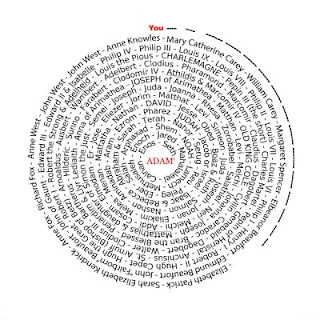
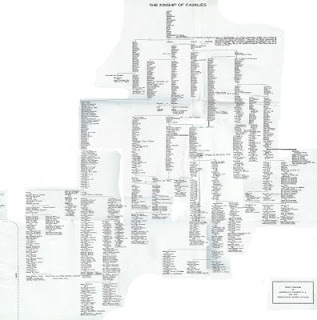
I have made a few charts that show family lines back to Adam and I have received several requests for information on how to do this. I will post an outline here of how I did it. Using a program developed at BYU called the Relationship Finder, I was able to connect my family to some members of Royalty. This program uses the family group information provided in the Ancestral File to link together related individuals and trace lines back to famous LDS church leaders, pioneers, presidents, early settlers, and European Royalty. The amount of information you will get back from this program is based on how much family information you have in the Ancestral File. From here I was able to use a genealogy chart I purchased from Stevenson's Genealogy in Provo, Utah. This chart was put together by Archibald F. Bennett for the Genealogical Society of Utah called the Kinship of Families. Kinship of Families I have a scanned image of it here, but my scanner is tiny so I had to piece it together. I called Sevenson's Genealogy for permission to post this chart and the manager said that he knows of no copyright on it, so here it is. You can get a good copy from Stevenson's. They traced the lines of a few of the modern day Prophets back to Royalty and then using these records of the Royalty and the Biblical records they were able to trace them back to Adam. So, I used the Relationship Finder, and the Ancestral File to tie my family into one of the members of Royalty on the Genealogy Chart I got and simply followed it back to Adam.
Instructions for Using the Relationship Finder

Relationship Finder
http://roots.cs.byu.edu/digroots


What Can This Do For Me?
Based on the information in the familysearch.org Ancestral File database, the Relationship Finder can link you to several famous people in your ancestry! These include LDS Church Leaders of old and present, Presidents of the United States, Signers of the Declaration of Independence, Members of the Early Pioneers, Travelers on the Mayflower, and European Royalty!

How Can I Make My Own Report?

First you need to find your Ancestal File Number
1) visit www.familysearch.org
2) click on the SEARCH RECORDS tab at the top of the screen
3) click on ANCESTRAL FILE to the left of the screen
4) type in the name of a DECEASED ANCESTOR and search
5) Click on the name of your ancestor to bring up their information
6) At the top of the screen to the right of their name you will find (AFN: ---)
7) If you want to move further down the pedigree, click on the Family Icon to the right and select another AFN

Second you need to go to the Relationship Finder
1) visit http://roots.cs.byu.edu/digroots
2) under the Main Menu on the left select #1 CREATE A SELF REPORT
3) Type in the AFN in the first box and left click the mouse
4) Click on the FINISHED button
5) Select the boxes for the groups you wish to search or click on SELECT ALL
6) In a few moments your report will appear!

How Do I Make a Copy?
On the top left of the screen you will find your print/save options
This is also where you can see how your line connects with theirs

HAVE FUN!

I have contacted the programmers of the Relationship Finder to ask them if the program would still work when the new family search is launched. They said they are preparing for this change and their program will be adjusted accordingly so it should continue to work. This program is free to use although you do need to set up an account by simply creating a username and password.

To make the spiral I used a program on line called festisite, however I had more names than the program would allow me to enter so I had to finish the spiral on photoshop. I hope this is helpful. You are welcome to post any questions you may have in trying to duplicate this and I will try to help.